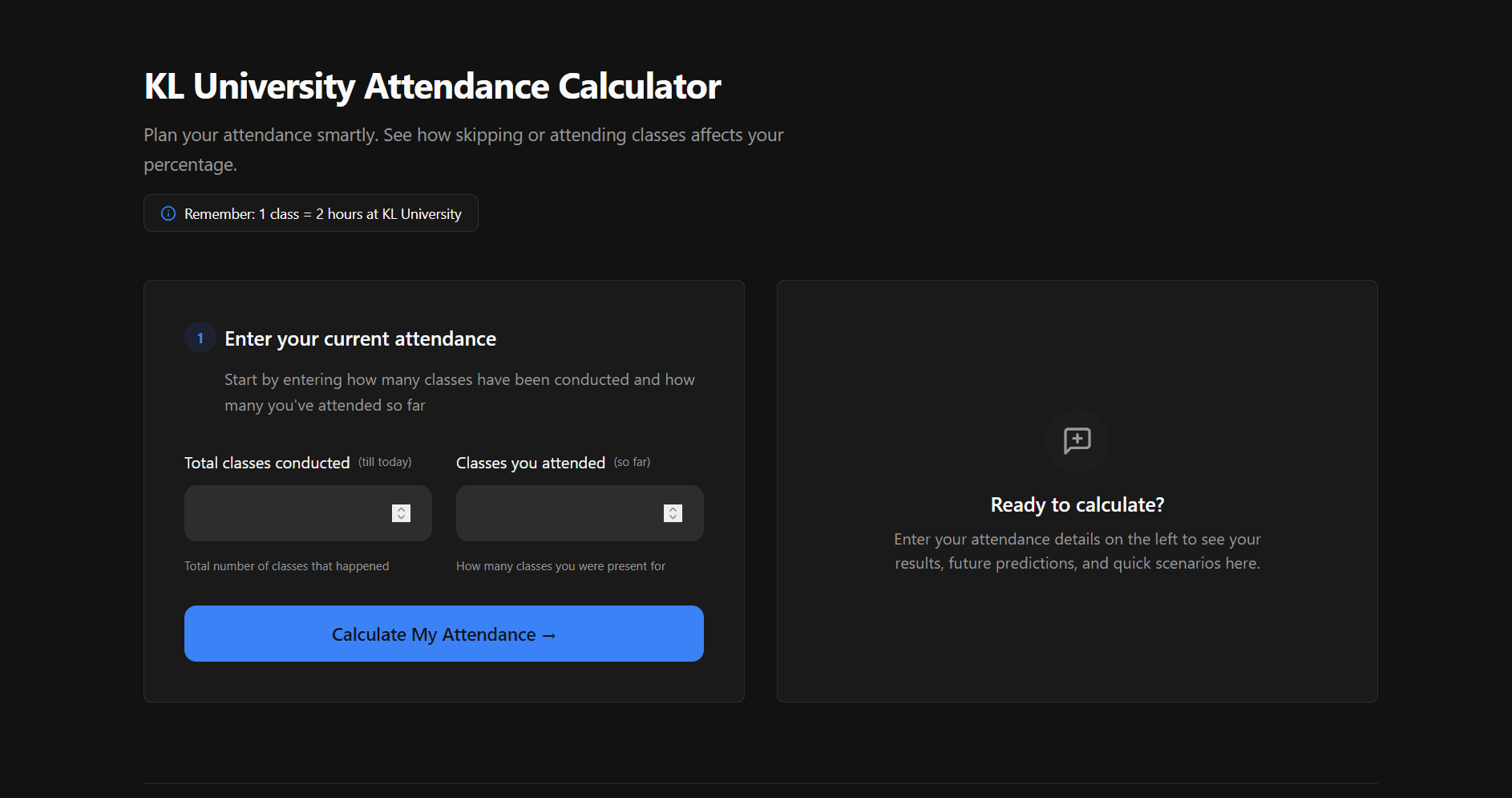
KL University Attendance Calculator
A lightweight, developer-friendly attendance calculator built with React, TypeScript and Vite. Compute attendance percentages, project future scenarios, and make informed decisions about class attendance.
Timeline
2 weeks
Role
Frontend Developer
Team
Solo
Status
CompletedTechnology Stack
Key Challenges
- Pure Function Design for Calculations
- Type-Safe Attendance Logic
- Scenario Planning Algorithm
- Responsive Table Design
- State Management with TanStack Query
Key Learnings
- React with Vite Setup
- TypeScript Pure Functions
- TanStack Query for Local State
- Component Composition Patterns
- CSS Variable Theming
KL University Attendance Calculator
Overview
A lightweight, developer-friendly attendance calculator built with React, TypeScript and Vite. This utility app helps students estimate attendance percentages and provides visual feedback so users can quickly understand how many classes they need to attend or can skip to reach a target attendance.
Built as a compact demo/utility app with a small, well-typed codebase that's intentionally easy to extend and test.
What Users Can Do
- Compute Current Attendance: Calculate attendance percentage for any course
- Project Future Attendance: See how upcoming classes affect your percentage
- Quick Scenario Previews: Instantly see impact of skipping/attending common numbers of classes
- Multi-Course Tracking: Track attendance for multiple subjects with average calculation
- Visual Status Feedback: Color-coded status indicators (at risk, okay, good)
- Attendance Planning: Plan your attendance strategy to meet the 75% requirement
Why I Built This
I created this tool to address common problems among KL University students:
- Students struggle to track attendance manually across multiple subjects
- Calculating attendance percentage is tedious and error-prone
- Understanding the impact of absent classes is difficult without projections
- Planning attendance strategy requires instant "what-if" calculations
- Quick decision-making about whether to skip a class needs real-time data
Tech Stack
- React - UI library for building interactive interfaces
- TypeScript - Type-safe development with well-defined interfaces
- Vite - Lightning-fast build tool with HMR
- TanStack Query - Used for derived local state computation
- Tailwind CSS - Utility-first CSS framework
- Vercel - Hosting platform
Project Architecture
Project Layout
src/
├── main.tsx                    # React bootstrap
├── App.tsx                     # App wrapper (Navbar + Home)
├── pages/
│   └── Home.tsx               # Main page (form -> calculator flow)
├── components/
│   ├── Navbar.tsx             # Header component
│   ├── AttendanceForm.tsx     # Input + validation
│   ├── AttendanceCalculator.tsx # Percent, planner, scenarios
│   └── AttendanceTable.tsx    # Multi-course table UI
├── utils/
│   └── calculateAttendance.ts # Pure calculation helpers
└── types/
    └── index.ts               # Shared TypeScript types
Core Types
interface Course {
  id: string;
  courseName: string;
  totalConducted: number;
  totalAttended: number;
  attendancePercentage: number | null;
}
Utility Functions
All calculation logic is kept in pure functions for easy testing:
- calculateAttendance(totalConducted, totalAttended) - Returns rounded percentage or null for invalid data
- getAttendanceColor(percentage) - Returns CSS class for color styling
- getAttendanceStatus(percentage) - Returns "at risk", "okay", or "good"
- calculateAverageAttendance(courses) - Aggregates multiple courses, ignoring invalid entries
Component Architecture
AttendanceForm
- Props:
{ onCalculate: (totalConducted, totalAttended) => void } - Behavior: Validates numeric inputs and calls onCalculate on success
AttendanceCalculator
- Props:
{ totalConducted: number; totalAttended: number } - Behavior: Shows current percentage, future planner (upcoming classes + planned attendance), and quick scenarios
- Uses TanStack Query locally to compute derived values
AttendanceTable
- Props:
{ courses: Course[]; averageAttendance: number | null; onDeleteCourse: (id) => void } - Behavior: Renders responsive table with per-course status badges
Application Flow
Home.tsxrendersAttendanceFormin the left column andAttendanceCalculatoron the rightAttendanceFormcollectstotalConductedandtotalAttended, then calls a handler in Home- Home passes the numbers to
AttendanceCalculatorwhich computes current percent and projections
Key Features
- Real-time Calculations: Instant attendance percentage calculations
- Scenario Planning: What-if scenarios for attendance planning
- Subject-wise Tracking: Track each subject independently
- Status Badges: Color-coded visual feedback (risk/okay/good)
- Mobile Responsive: Works seamlessly on all devices
- Fast & Lightweight: Vite-powered with minimal dependencies
- Type-Safe: Full TypeScript coverage for reliability
Development Notes
- Keep computation logic in
src/utils/calculateAttendance.tsfor easy testing - UI is intentionally small and unopinionated; follow existing patterns when adding components
- Codebase uses CSS variable tokens like
--color-foregroundfor theme consistency AttendanceCalculatoruses tinyuseQueryfor derived local state (no network involved)
Future Enhancements
- Integration with university portal API
- Historical data tracking and trends
- Export functionality (PDF/CSV)
- Multi-semester tracking
- Push notifications for low attendance alerts
- Unit tests with Vitest