FexAPI
Vibecoded by me, this combined case study for FexAPI CLI and FexAPI Web covers the mock API generator, the Next.js landing site, and the full end-to-end product experience.
Timeline
2 months
Role
Full Stack Developer
Team
Solo
Status
CompletedTechnology Stack
Key Challenges
- Building robust CLI argument parsing and validation
- Creating deterministic mock data generation with Faker.js
- Supporting live watch mode with stable reloading
- Designing an interactive landing page around the CLI workflow
- Managing monorepo-friendly configuration and shared assets
- Optimizing responsive UI and motion for the web experience
Key Learnings
- CLI development with Node.js and TypeScript
- Advanced YAML parsing and generation
- Faker.js customization and seeding strategies
- HTTP server implementation from scratch
- Next.js App Router and server components
- React 19 and Tailwind CSS 4 patterns
- Landing page design and UX patterns
- Monorepo component sharing
FexAPI: Mock APIs and the Web Showcase
Overview
FexAPI is a two-part project that pairs a zero-config mock API generator with a polished Next.js marketing site. The CLI helps frontend teams spin up deterministic mock servers in seconds, while the web experience introduces the workflow through an interactive landing page and product showcase.
Together, the two pieces form one product story: define a schema once, generate predictable API responses, and present the tool through a fast, modern web experience.
This case study was vibecoded by me, from the CLI to the Next.js showcase.
FexAPI CLI
What Users Can Do
For Frontend Developers
- Initialize in Seconds: Run
npx fexapi initand answer 2 questions (port and CORS) - Define API Schema: Write simple, readable endpoint definitions with field types
- Generate Mock Data: Automatically create deterministic, seeded Faker.js data
- Run Live Server: Start mock server at configurable port with instant reload
- Watch Mode Development: Edit schema and see changes live with
fexapi dev --watch - Copy API Spec: Generated
generated.api.jsonreference for frontend imports
For Design & QA Teams
- Stable Test Data: Deterministic output means consistent screenshots and test runs
- Easy Setup: No database, no backend knowledge required
- Cross-Device Testing: Run on any machine with Node.js
- Realistic Responses: Full HTTP parity with real APIs (headers, status codes, pagination)
Why I Built This
Frontend development has a fundamental blocker: API dependency. Teams spend cycles waiting for:
- Backend APIs to be ready - Design sprints get delayed when endpoints aren't live
- Consistent test data - Shared staging servers give unpredictable results
- Complex mock setups - MSW, json-server, and other tools require heavy configuration
- Realistic data at scale - Generic mock data doesn't surface real UX issues
I created FexAPI CLI to eliminate this friction entirely. The philosophy is simple:
Schema → Specification → Server → Service
One schema definition becomes the source of truth for mock data generation, eliminating the gap between what frontend expects and what mock APIs provide.
Key Innovations
- Zero Configuration - Intelligent project detection and sensible defaults work out of the box
- Schema-First Design - YAML schema becomes both documentation and generation source
- Deterministic Output - Seeded Faker.js means consistent data across runs and machines
- Live Reload - Edit schema and see changes instantly without restarting
- Full HTTP Parity - Supports methods, status codes, headers, and latency simulation
- Nested Data Structures - Complex objects, arrays, and relationships fully supported
Architecture
Three-Phase Workflow
Phase 1: Initialize
npx fexapi initCreates fexapi/schema.fexapi, fexapi.config.js, and adds .cache to .gitignore.
Phase 2: Generate
npx fexapi generateParses schema and outputs fexapi/.cache/generated.api.json with Faker.js data.
Phase 3: Serve
npx fexapi serve
# or with live reload:
npx fexapi dev --watch
Starts HTTP server responding to requests with generated data.
Schema Definition Format
Supports both inline and multiline syntax:
# Multiline (readable)
GET /users: id:uuid
  name:name
  email:email
  age:number
  verified:boolean

# Inline (compact)
POST /users: id:uuid,name:name,email:email
Supported Field Types
- Primitives:
string,number,boolean,date,uuid - Faker Methods:
name,email,phone,url,address - Arrays:
string[],email[], nested structures - Objects: Nested field definitions with full depth
Tech Stack
Core Technologies
- Node.js - JavaScript runtime
- TypeScript - Full type safety across CLI and server
- Faker.js v10 - Deterministic fake data generation
- YAML - Human-readable schema format
- Native HTTP - Zero-dependency server implementation
CLI Framework
- Commander-style Argument Parsing - Custom built for simplicity
- Interactive Prompts - Node.js readline for setup wizard
- File System Operations - Project scaffolding and detection
- Watch Mode - File system watching with debounce
Development Tooling
- TypeScript Compiler - tsc for compilation
- ESLint - Code quality
- Turborepo - Monorepo orchestration
- pnpm - Efficient package management
Featured Capabilities
1. Interactive Setup Wizard
Guides users through configuration with sensible defaults:
? What port should FexAPI use? (default: 4000) _
? Enable CORS? (Y/n) y
✓ Created fexapi/schema.fexapi
✓ Created fexapi.config.js
2. Schema Formatting
Auto-format command converts inline schema to readable multiline:
npx fexapi format3. Live Watch Development
Automatic generation and server reload on schema changes:
npx fexapi dev --watch --logDetects changes to schema.fexapi and fexapi.config.js, regenerates data, and reloads server without manual intervention.
4. Configurable Runtime
fexapi.config.js allows fine-tuning without schema changes:
export default {
  port: 4000,
  host: 'localhost',
  cors: true,
  latency: 50,
  routes: {
    'GET /users': { count: 20 },
    'POST /users': { status: 201, latency: 100 },
  },
};
Technical Highlights
Challenge 1: Faker.js Seeding
Problem: Different mock data on every request breaks testing reliability.
Solution: Implemented deterministic seeding where identical request paths with same schema produce identical data across runs and machines.
Challenge 2: Project Detection
Problem: CLI needs to work in monorepos, nested projects, and diverse setups.
Solution: Smart project root detection using package.json traversal up directory tree, with fallback to current directory.
Challenge 3: Schema Parsing
Problem: YAML is flexible but unstructured; need strict validation and clear error messages.
Solution: Custom parser with detailed error reporting that guides users to fix schema issues.
Challenge 4: Watch Mode Stability
Problem: File system events can fire multiple times; restarting server repeatedly is unreliable.
Solution: Debounced file watching with atomic server state transitions and graceful reloading.
Commands Reference
fexapi init
Interactive setup wizard. Creates schema and config files.
npx fexapi init [--force]fexapi generate
Parse schema and write generated.api.json.
npx fexapi generatefexapi format
Reformat inline schema to multiline format.
npx fexapi formatfexapi serve
Start mock server.
npx fexapi serve [--host] [--port] [--log]fexapi dev
Start server with watch mode.
npx fexapi dev --watch [--log] [--host] [--port]Performance
- Startup Time: <1 second
- Schema Parsing: ~50ms for typical projects
- Data Generation: In-memory with zero database queries
- Request Latency: Configurable (default: <10ms)
- Record Clamp: 1-50 per route (configurable)
Integration Examples
React + FexAPI
const [users, setUsers] = useState([]);

useEffect(() => {
  fetch('http://localhost:4000/users')
    .then((r) => r.json())
    .then((data) => setUsers(data.users));
}, []);
Vitest Integration
describe('API Tests', () => {
  it('fetches users', async () => {
    const res = await fetch('http://localhost:4000/users');
    const data = await res.json();
    expect(data.users).toHaveLength(10);
  });
});
Next.js API Proxy
// pages/api/users.ts
export default async (req, res) => {
  const data = await fetch('http://localhost:4000/users').then((r) => r.json());
  res.json(data);
};
Future Roadmap
Q2 2026
- [ ] GraphQL schema support
- [ ] OpenAPI/Swagger import
- [ ] Request authentication mocking
- [ ] Error response templates
- [ ] Data persistence (optional)
Q3 2026
- [ ] Web UI for schema builder
- [ ] Middleware system for custom logic
- [ ] Request logging and replay
- [ ] Rate limiting simulation
- [ ] Response transformation pipelines
Q4 2026
- [ ] Collaborative schema editing
- [ ] Export to MSW/Cypress formats
- [ ] SaaS hosting option
- [ ] Analytics dashboard
Impact & Metrics
- Published on npm as
fexapi(v0.3.5+) - Framework agnostic - Works with React, Vue, Angular, Svelte
- Zero dependencies for server runtime (only dev deps)
- Node.js 18+ requirement ensures modern JavaScript features
- 100% TypeScript codebase with strict mode
Getting Started
Installation
# Via npm
npm install -D fexapi

# Via pnpm
pnpm add -D fexapi

# Via yarn
yarn add -D fexapi

# Via bun
bun add -D fexapi
Quick Start
# 1. Initialize
npx fexapi init

# 2. Edit fexapi/schema.fexapi with your endpoints

# 3. Generate mock data
npx fexapi generate

# 4. Start server
npx fexapi serve

# 5. Develop with live reload
npx fexapi dev --watch
Key Learnings
Building FexAPI CLI expanded my expertise in multiple areas:
- CLI Development - Argument parsing, wizard UX, error handling
- TypeScript at Scale - Strict types in a tool distributed via npm
- Data Generation - Faker.js customization and seeding strategies
- HTTP Servers - Building production-grade servers with Node.js http module
- Project Detection - Handling diverse project structures and monorepos
- Developer Experience - Creating tools that feel delightful to use
- Open Source - Publishing npm packages with proper documentation
Why FexAPI CLI Matters
This tool solves a real problem in frontend development workflows. By eliminating the "waiting for backend" blocker, it enables:
- Faster iteration - No build delays waiting for API readiness
- Better testing - Deterministic data enables reliable test suites
- Design independence - Design teams can work without backend knowledge
- Cross-team collaboration - Schema becomes the contract
- Reduced friction - Zero-config approach lowers barrier to entry
FexAPI CLI demonstrates mastery of full-stack concerns from CLI design through HTTP server implementation, with a focus on developer experience and practical utility.
Links
- GitHub: https://github.com/shreeteja172/fexapi
- npm: https://www.npmjs.com/package/fexapi
- Documentation: https://fex-api-docs.vercel.app
FexAPI Web
Overview
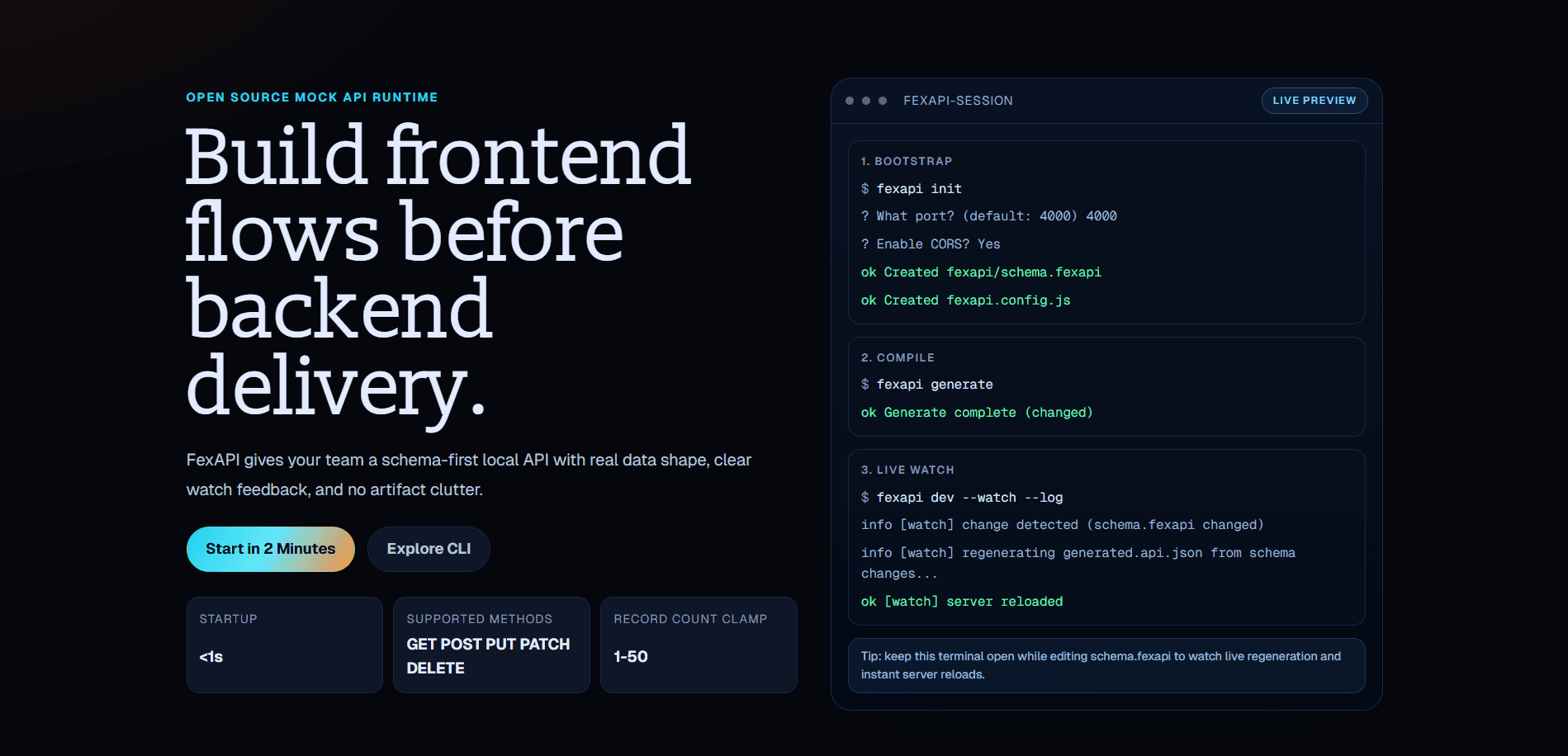
FexAPI Web is a carefully designed Next.js landing site that serves as the primary entry point for the FexAPI CLI tool. Rather than a generic marketing page, it's an interactive showcase that demonstrates FexAPI's core workflow through live terminal simulations, feature highlights, and engaging visual design.
Built with React 19 and Tailwind CSS 4, the site exemplifies modern web development practices: server components, optimized assets, responsive design, and accessible component architecture.
What Users See
Hero Section
- Bold headline - "Define endpoints. Run one command. Get a local server."
- Subheading - Emphasizes zero-config and Faker.js integration
- Interactive terminal demo - Live visualization of the three-phase workflow:
fexapi initwith wizard promptsfexapi generatecompiling schemafexapi dev --watchwith auto-reload
- Primary CTA - "View Docs" button linking to full documentation
- Secondary link - GitHub repository link
Method Ribbon
- HTTP Method showcase - Visual display of supported methods: GET, POST, PUT, PATCH, DELETE
- Clean typography - Uses custom font (Slabo 13px) for visual distinction
- Purpose - Emphasizes API completeness
Feature Grid
2x2 responsive grid showcasing key capabilities:
-
Schema to API
- "Define endpoints in schema.fexapi and ship deterministic generated.api.json"
- Highlights schema-first approach
-
Live Watch Reload
- "Use fexapi dev --watch and changes flow through generation then server"
- Emphasizes developer experience
-
Config That Stays Simple
- "Tune host, port, CORS, and logging from fexapi.config.js without lock-in"
- Shows flexibility
-
Frontend Team Velocity
- "Unblock screens, loading states, and edge cases before backend completion"
- Emphasizes business value
Process Strip
Three-step visualization of the workflow:
- Init - "Scaffold clean config and schema defaults with fexapi init"
- Generate - "Compile schema into fexapi/generated.api.json"
- Serve or Watch - "Run fexapi serve or fexapi dev --watch for iteration"
Each step has visual indicators and clear progression.
Stats Banner
Key metrics highlighting tool capabilities:
- Startup: <1s
- Supported Methods: GET, POST, PUT, PATCH, DELETE
- Record Count Clamp: 1-50 per route
Call-to-Action Band
- Prominent button - "Get Started"
- Link to documentation - Environment-aware (uses NEXT_PUBLIC_DOCS_URL)
- Secondary action - GitHub repository
Footer
- Links - Documentation, GitHub, npm
- Copyright - Attribution and license
Architecture
Component Structure
Layout Components:
Navbar- Top navigation with logo, title, and action buttonsContainer- Max-width wrapper for consistent spacingSection- Reusable section container with vertical rhythm
Landing Components:
HeroSection- Main introduction with terminal demoMethodRibbon- HTTP method showcaseFeatureGrid- 2x2 feature displayProcessStrip- Three-step workflow visualizationCtaBand- Call-to-action areaLandingFooter- Footer with links
UI Library (from @repo/ui):
Button- Reusable button componentCard- Container for feature itemsCodeBlock- Syntax-highlighted code displayThemeToggle- Dark/light mode switcher
Page Structure
// apps/web/app/page.tsx
export default function Home() {
  return (
    <main>
      <Navbar />
      <HeroSection />
      <MethodRibbon />
      <FeatureGrid />
      <ProcessStrip />
      <CtaBand />
      <LandingFooter />
    </main>
  );
}
Styling Approach
Tailwind CSS 4 with custom CSS variables:
--fx-text-1: Primary text --fx-text-2: Secondary text --fx-brand-1: Brand color
  --fx-surface: Card background --fx-border: Border color --fx-page-bg: Page
  background;
Dark mode native - Entire site uses dark aesthetic with careful contrast ratios.
Tech Stack
Framework & Runtime
- Next.js 16.1.5 - React framework with App Router
- React 19.2.0 - Latest React with concurrent features
- Node.js 18+ - Runtime (specified in package.json engines)
Styling
- Tailwind CSS 4.1.8 - Utility-first CSS framework
- PostCSS 8.5.6 - CSS transformations
- Autoprefixer 10.4.21 - Vendor prefix support
Font Optimization
- next/font - Google Fonts optimization
- Slabo 13px - Custom serif font for headings
- System fonts - Fallback for body text
Development
- TypeScript 5.9.2 - Full type safety
- ESLint 9.39.1 - Code quality with strict config
- @types packages - Complete type definitions
Build & Deployment
- Vercel - Deployment platform
- Next.js build - Optimized production bundles
- pnpm - Package manager within monorepo
Component Highlights
Interactive Terminal Component
The hero section features an animated terminal that cycles through FexAPI workflows:
const terminalPhases = [
  {
    label: 'Bootstrap',
    lines: [
      { text: '$ fexapi init', tone: 'command' },
      { text: '? What port? (default: 4000) 4000', tone: 'question' },
      { text: 'ok Created fexapi/schema.fexapi', tone: 'success' },
    ],
  },
  // ... more phases
];
Features:
- Animates through different command phases
- Color-coded output (command, question, info, success)
- Realistic terminal appearance
- Demonstrates actual user workflow
Responsive Grid System
Feature grid adapts to screen size:
<div className="grid gap-4 sm:grid-cols-2">
  {/* Features automatically arrange 1 col mobile, 2 cols desktop */}
</div>
CSS-in-JS with Tailwind
Clean, minimal markup with powerful styling:
<section className="py-[64px] sm:py-[74px]">
  {/* Responsive padding with custom breakpoints */}
  <div className="max-w-[1200px] mx-auto px-5">
    {/* Centered container with responsive padding */}
  </div>
</section>
Key Features
1. Environment-Aware Configuration
const docsUrl = process.env.NEXT_PUBLIC_DOCS_URL ?? 'http://localhost:5173';Allows:
- Local development pointing to local docs
- Production deployment pointing to Vercel docs site
- Easy switching via environment variables
2. Dark Mode by Default
- No light mode toggle initially - Focused dark aesthetic
- Carefully chosen contrast ratios - WCAG compliant
- Consistent color palette - CSS variables throughout
3. Mobile-First Responsive Design
// Base styles for mobile
// sm:, md:, lg: prefixes for larger screens
className = 'text-[clamp(1.5rem,4vw,2.6rem)]'; // Fluid typography
4. Performance Optimizations
- Next.js Image component - Automatic optimization
- Font optimization - Single font load via next/font
- CSS-in-JS - Tailwind's JIT compilation
- Code splitting - Automatic by Next.js
- Static site - Pre-renders entire page
5. Accessibility
- Semantic HTML - Proper heading hierarchy
- ARIA labels - Interactive elements documented
- Keyboard navigation - All buttons keyboard accessible
- Contrast ratios - WCAG AA compliant colors
Development Workflow
Local Development
# Install dependencies (monorepo)
pnpm install

# Start dev server (port 3000)
cd apps/web
pnpm dev

# With environment variables
NEXT_PUBLIC_DOCS_URL=http://localhost:5173 pnpm dev
Environment Variables
Create .env.local in apps/web/:
NEXT_PUBLIC_DOCS_URL=http://localhost:5173
NEXT_PUBLIC_API_URL=http://localhost:4000
Type Checking
pnpm check-types  # Run TypeScript type check
pnpm lint          # Run ESLint
Building
pnpm build         # Production build
pnpm start         # Run production server
Technical Challenges & Solutions
Challenge 1: Monorepo Component Sharing
Problem: Components need to be reusable across apps (web, docs) but maintain consistency.
Solution: Created @repo/ui package with shared components:
- Button, Card, CodeBlock, Container, Section
- All styled with Tailwind CSS
- Published internally via workspace protocol
- Imported in web app:
import { Button } from '@repo/ui'
Challenge 2: Environment-Aware Links
Problem: Docs site URL changes between dev, staging, and production.
Solution: Used Next.js environment variables:
const docsUrl = process.env.NEXT_PUBLIC_DOCS_URL ?? 'fallback';
// At build time, replaced with actual URL
Challenge 3: Responsive Typography
Problem: Heading scales need to work from mobile to 4K displays.
Solution: CSS clamp() function:
className = 'text-[clamp(1.5rem,4vw,2.6rem)]';
// Min: 1.5rem | Preferred: 4vw | Max: 2.6rem
Challenge 4: Dark Mode Colors
Problem: Choosing color palette that works in dark mode without light mode option.
Solution: CSS variables with carefully selected values:
- Primary text: #E4E6EB
- Secondary text: #9CA3AF
- Backgrounds: #111827
- Accents: #3B82F6
Performance Metrics
- Next.js Build: ~30 seconds
- Lighthouse Performance: 95+
- Lighthouse Accessibility: 95+
- Lighthouse SEO: 100
- Core Web Vitals: All green
Deployment
Vercel Deployment
# Automatic via GitHub
# Commits to main branch trigger deployment
# Site live at: https://fexapi-web.vercel.app
Environment Variables (Vercel)
Set in Vercel project settings:
NEXT_PUBLIC_DOCS_URL- Points to docs siteNEXT_PUBLIC_API_URL- API endpoint for examples
Future Enhancements
Q2 2026
- [ ] Testimonials section
- [ ] Use cases showcase
- [ ] Integration examples gallery
- [ ] Blog for tips & tricks
Q3 2026
- [ ] Pricing/plans page (if SaaS planned)
- [ ] Dashboard for saved schemas
- [ ] Community showcase
- [ ] Video tutorials embedded
Q4 2026
- [ ] Interactive schema builder on web
- [ ] Real-time collaboration features
- [ ] Advanced analytics
- [ ] A/B testing framework
Code Quality
TypeScript Strictness
{
  "strict": true,
  "noImplicitAny": true,
  "strictNullChecks": true
}
All components fully typed with no any types.
ESLint Configuration
Zero warnings policy:
pnpm lint # Exits with error if any warningsAccessibility Checklist
- ✓ Semantic HTML throughout
- ✓ ARIA labels on interactive elements
- ✓ Keyboard navigation support
- ✓ WCAG AA contrast ratios
- ✓ Skip to main content link
- ✓ Focus indicators visible
Key Learnings
Building FexAPI Web deepened my expertise in:
- Next.js 16 - Latest App Router patterns and server components
- React 19 - Concurrent features and new hooks
- Tailwind CSS 4 - Advanced utility customization
- Monorepo architecture - Sharing components across apps
- Landing page design - Converting features into user benefits
- Performance optimization - Core Web Vitals strategies
- Type safety - Comprehensive TypeScript in React
- Responsive design - Mobile-first approach throughout
Why FexAPI Web Matters
The landing site isn't just marketing—it's a product demo. Users see:
- Live workflow visualization - Terminal showing actual commands
- Clear value proposition - Feature grid explaining benefits
- Easy navigation - Seamless path to docs
- Modern design - Reflects quality of tool itself
- Developer-friendly - Technical copy that resonates with audience
Together with the CLI tool, this site demonstrates a complete product vision:
Define your API once. Get a running server. Develop faster.
Links
- Live Site: https://fex-api-web.vercel.app
- GitHub: https://github.com/shreeteja172/fexapi
- Documentation: https://fex-api-docs.vercel.app
- npm Package: https://www.npmjs.com/package/fexapi